以期刊任职新增进行说明
一、 配置自定义表单
- 在数据库表
form_deployments中新增一条表单数据insert into form_deployments(id, code, name, content, remarks, tenant_id) values ('journal-appointment', '0120', '期刊任职', '{ "sections": [ { "key": "basic", "label": "基本信息", "fields": [ { "key": "userId", "type": "declarant", "label": "任职人员", "placeholder": "请选择任职人员", "span": 24 }, { "key": "journalId", "type": "periodical", "label": "期刊", "placeholder": "请选择期刊", "span": 24 }, { "key": "englishAppointedPosition", "type": "appointed", "label": "聘任职务(英文)", "placeholder": "请输入聘任职务(英文)", "span": 12, "visible": false }, { "key": "appointee", "type": "appointed", "label": "任职人姓名(英文)", "placeholder": "请输入任职人姓名(英文)", "span": 12, "visible": false }, { "key": "appointedPosition", "type": "dictionaries", "label": "聘任职务", "placeholder": "请选择聘任职务", "span": 12, "meta": { "type": "appointed-position" } }, { "key": "session", "type": "title", "label": "所任届/次", "placeholder": "请输入所任届/次", "span": 12 }, { "key": "datetimeRange", "type": "datetime-range", "label": "任职起止时间", "placeholder": "请输入任职起止时间", "span": 12, "meta": { "endRequired": true } } ] }, { "key": "attachments", "label": "上传附件", "fields": [ { "key": "attachments", "type": "file", "label": "兼职证书", "placeholder": "", "span": 24 }, { "key": "other-attachments", "type": "file", "label": "其他", "placeholder": "", "span": 24, "required": false } ] } ] }', '期刊任职自定义表单', 'a1fa8c64c75f4bc5b520bd6b8af5f6f9') - 表名是
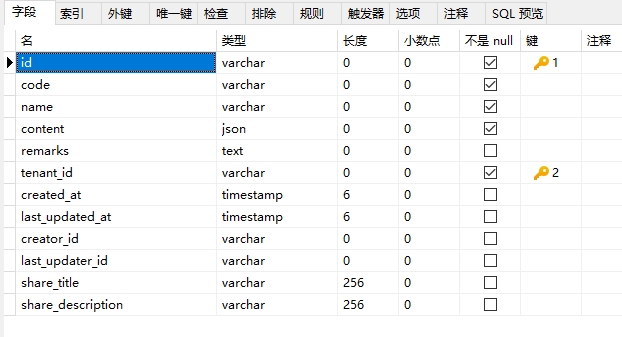
form_deployments,字段如下
| 字段 | 名称 | 备注 |
|---|---|---|
| id | 主键 | 如果是新增页面的表单,id的值和配置路由的path有关,会把path进行截取,id设置成截取之后的值(本示例的值是journal-appointment), 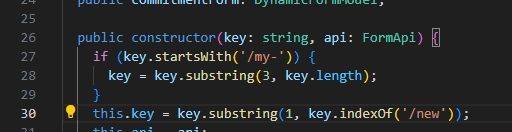 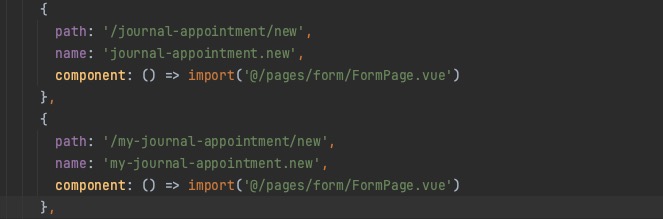 |
| tenant_id | 单位id | |
| code | 编码 | 根据序号自增 |
| name | 名称 | 自定义表单的名称 |
| content | 内容 | 表单需要填写的内容,content说明请查看content说明 |
| remarks | 备注 | |
| created_at | 创建时间 | |
| last_updated_at | 最后更新时间 | |
| creator_id | 创建人 | |
| last_updater_id | 最后修改人 | |
| share_title | 暂未使用 | |
| share_description | 暂未使用 |
- 表form_deployments字段content说明
content结构如下图
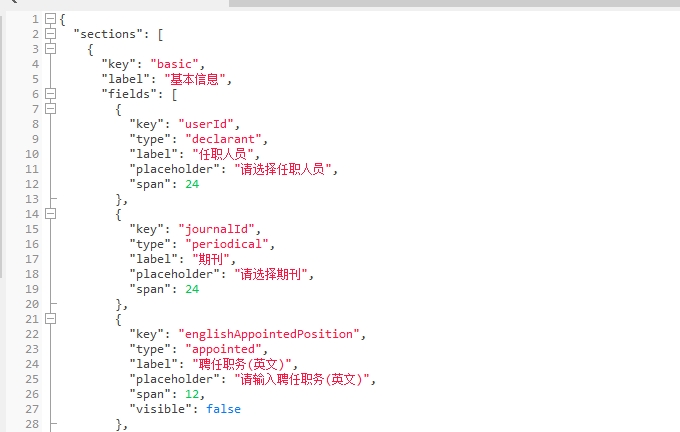
sections是一个数组,数组中的每个元素是表单中的一个单独的信息模块,如图: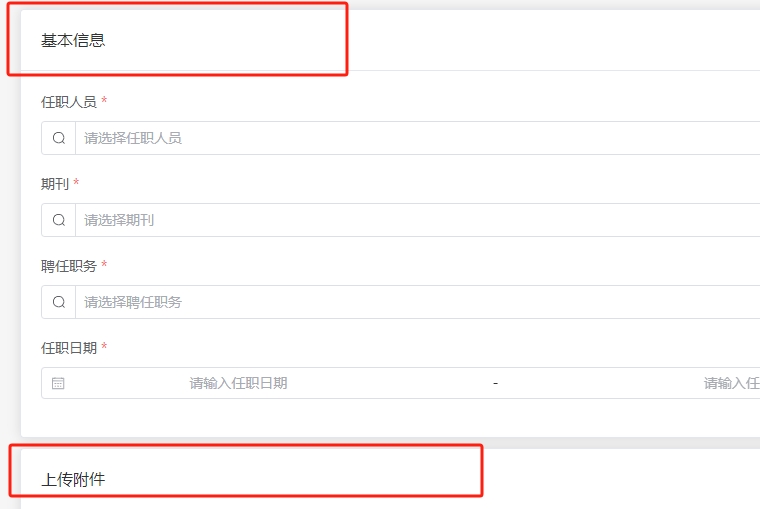
key表示模块的id,lable是模块显示名字,fields里面是用来指定这个模块需要用到的表单组件。
在fields中,key用来指定组件的返回值的参数名,后续用这个名字来获取组件对应的返回值,type是要使用的组件的key,label是表单子项的名字,placeholder是组件内的提示语,span是组件要的宽度,hiddeen是组件是否隐藏,visible是组件时候显示,readonly`是组件是否为只读状态。
作者:向海林 创建时间:2023-10-17 11:02
最后编辑:马翠萍 更新时间:2026-10-22 08:56
最后编辑:马翠萍 更新时间:2026-10-22 08:56