一、引言
3.0业务中新增的业务数据大部分都需要通过流程新增,下面以期刊任职为例进行说明
二、步骤
- 新增默认流程
- 发布流程
- 配置页面和权限
- 配置新增按钮
- 配置自定义表单
- 编写后端代码
三、步骤说明
1. 新增默认流程
在数据库表
wf_workflows中插入流程数据, sql语句如下insert into wf_workflows (id, code, name, type, flow_data, remarks, creator_id, created_at, last_updater_id, last_updated_at, flow_key, tenant_id) values ('299b525cf96f4b2aa32774523ae9a5d6', '0018', '期刊任职', 'journal-appointment', '<?xml version="1.0" encoding="UTF-8"?> <bpmn:definitions xmlns:bpmn="http://www.omg.org/spec/BPMN/20100524/MODEL" xmlns:bpmndi="http://www.omg.org/spec/BPMN/20100524/DI" xmlns:dc="http://www.omg.org/spec/DD/20100524/DC" xmlns:xsi="http://www.w3.org/2001/XMLSchema-instance" xmlns:di="http://www.omg.org/spec/DD/20100524/DI" xmlns:camunda="http://camunda.org/schema/1.0/bpmn" xmlns:modeler="http://camunda.org/schema/modeler/1.0" id="Definitions_03tlio5" targetNamespace="http://bpmn.io/schema/bpmn" exporter="Camunda Modeler" exporterVersion="5.4.2" modeler:executionPlatform="Camunda Platform" modeler:executionPlatformVersion="7.18.0"> <bpmn:process id="journal-appointment" name="期刊任职" isExecutable="true"> <bpmn:startEvent id="StartEvent_1" name="开始"> <bpmn:outgoing>Flow_05h5ws4</bpmn:outgoing> </bpmn:startEvent> <bpmn:sequenceFlow id="Flow_05h5ws4" sourceRef="StartEvent_1" targetRef="Activity_043b17p" /> <bpmn:userTask id="Activity_043b17p" name="提交" camunda:formKey="journal-appointment" camunda:assignee="${submitter}"> <bpmn:extensionElements> <camunda:inputOutput> <camunda:inputParameter name="isSubmitNode">true</camunda:inputParameter> </camunda:inputOutput> </bpmn:extensionElements> <bpmn:incoming>Flow_05h5ws4</bpmn:incoming> <bpmn:incoming>Flow_050dtzl</bpmn:incoming> <bpmn:outgoing>Flow_07n0djd</bpmn:outgoing> </bpmn:userTask> <bpmn:userTask id="Activity_0ac5n6y" name="审核" camunda:formKey="journal-appointment.review" camunda:candidateGroups="0227edd7dc9c42e2991e591b2981ce14"> <bpmn:incoming>Flow_07n0djd</bpmn:incoming> <bpmn:outgoing>Flow_16qx4pn</bpmn:outgoing> </bpmn:userTask> <bpmn:endEvent id="Event_1l9ymyx" name="流程结束(通过)"> <bpmn:extensionElements> <camunda:inputOutput> <camunda:inputParameter name="finishNode">true</camunda:inputParameter> </camunda:inputOutput> </bpmn:extensionElements> <bpmn:incoming>Flow_097y940</bpmn:incoming> </bpmn:endEvent> <bpmn:exclusiveGateway id="Gateway_1tw7g00" default="Flow_050dtzl"> <bpmn:incoming>Flow_16qx4pn</bpmn:incoming> <bpmn:outgoing>Flow_050dtzl</bpmn:outgoing> <bpmn:outgoing>Flow_097y940</bpmn:outgoing> <bpmn:outgoing>Flow_1hlbjpg</bpmn:outgoing> </bpmn:exclusiveGateway> <bpmn:sequenceFlow id="Flow_16qx4pn" sourceRef="Activity_0ac5n6y" targetRef="Gateway_1tw7g00" /> <bpmn:sequenceFlow id="Flow_050dtzl" name="驳回" sourceRef="Gateway_1tw7g00" targetRef="Activity_043b17p" /> <bpmn:sequenceFlow id="Flow_097y940" name="通过" sourceRef="Gateway_1tw7g00" targetRef="Event_1l9ymyx"> <bpmn:conditionExpression xsi:type="bpmn:tFormalExpression">${result=="approved"}</bpmn:conditionExpression> </bpmn:sequenceFlow> <bpmn:endEvent id="Event_16txwl7" name="流程结束(不通过)"> <bpmn:incoming>Flow_1hlbjpg</bpmn:incoming> </bpmn:endEvent> <bpmn:sequenceFlow id="Flow_1hlbjpg" name="终止" sourceRef="Gateway_1tw7g00" targetRef="Event_16txwl7"> <bpmn:conditionExpression xsi:type="bpmn:tFormalExpression">${result=="aborted"}</bpmn:conditionExpression> </bpmn:sequenceFlow> <bpmn:sequenceFlow id="Flow_07n0djd" sourceRef="Activity_043b17p" targetRef="Activity_0ac5n6y" /> </bpmn:process> <bpmndi:BPMNDiagram id="BPMNDiagram_1"> <bpmndi:BPMNPlane id="BPMNPlane_1" bpmnElement="journal-appointment"> <bpmndi:BPMNShape id="_BPMNShape_StartEvent_2" bpmnElement="StartEvent_1"> <dc:Bounds x="152" y="159" width="36" height="36" /> <bpmndi:BPMNLabel> <dc:Bounds x="159" y="202" width="22" height="14" /> </bpmndi:BPMNLabel> </bpmndi:BPMNShape> <bpmndi:BPMNShape id="Activity_1l4zy54_di" bpmnElement="Activity_043b17p"> <dc:Bounds x="240" y="137" width="100" height="80" /> <bpmndi:BPMNLabel /> </bpmndi:BPMNShape> <bpmndi:BPMNShape id="Activity_16cr2xo_di" bpmnElement="Activity_0ac5n6y"> <dc:Bounds x="490" y="137" width="100" height="80" /> <bpmndi:BPMNLabel /> </bpmndi:BPMNShape> <bpmndi:BPMNShape id="Event_1l9ymyx_di" bpmnElement="Event_1l9ymyx"> <dc:Bounds x="882" y="159" width="36" height="36" /> <bpmndi:BPMNLabel> <dc:Bounds x="856" y="202" width="88" height="14" /> </bpmndi:BPMNLabel> </bpmndi:BPMNShape> <bpmndi:BPMNShape id="Gateway_1tw7g00_di" bpmnElement="Gateway_1tw7g00" isMarkerVisible="true"> <dc:Bounds x="735" y="152" width="50" height="50" /> </bpmndi:BPMNShape> <bpmndi:BPMNShape id="Event_16txwl7_di" bpmnElement="Event_16txwl7"> <dc:Bounds x="882" y="72" width="36" height="36" /> <bpmndi:BPMNLabel> <dc:Bounds x="864" y="115" width="77" height="27" /> </bpmndi:BPMNLabel> </bpmndi:BPMNShape> <bpmndi:BPMNEdge id="Flow_05h5ws4_di" bpmnElement="Flow_05h5ws4"> <di:waypoint x="188" y="177" /> <di:waypoint x="240" y="177" /> </bpmndi:BPMNEdge> <bpmndi:BPMNEdge id="Flow_16qx4pn_di" bpmnElement="Flow_16qx4pn"> <di:waypoint x="590" y="177" /> <di:waypoint x="735" y="177" /> </bpmndi:BPMNEdge> <bpmndi:BPMNEdge id="Flow_050dtzl_di" bpmnElement="Flow_050dtzl"> <di:waypoint x="760" y="202" /> <di:waypoint x="760" y="260" /> <di:waypoint x="290" y="260" /> <di:waypoint x="290" y="217" /> <bpmndi:BPMNLabel> <dc:Bounds x="514" y="242" width="22" height="14" /> </bpmndi:BPMNLabel> </bpmndi:BPMNEdge> <bpmndi:BPMNEdge id="Flow_097y940_di" bpmnElement="Flow_097y940"> <di:waypoint x="785" y="177" /> <di:waypoint x="882" y="177" /> <bpmndi:BPMNLabel> <dc:Bounds x="823" y="159" width="22" height="14" /> </bpmndi:BPMNLabel> </bpmndi:BPMNEdge> <bpmndi:BPMNEdge id="Flow_1hlbjpg_di" bpmnElement="Flow_1hlbjpg"> <di:waypoint x="760" y="152" /> <di:waypoint x="760" y="90" /> <di:waypoint x="882" y="90" /> <bpmndi:BPMNLabel> <dc:Bounds x="765" y="119" width="22" height="14" /> </bpmndi:BPMNLabel> </bpmndi:BPMNEdge> <bpmndi:BPMNEdge id="Flow_07n0djd_di" bpmnElement="Flow_07n0djd"> <di:waypoint x="340" y="177" /> <di:waypoint x="490" y="177" /> </bpmndi:BPMNEdge> </bpmndi:BPMNPlane> </bpmndi:BPMNDiagram> </bpmn:definitions> ', '', 'f354b3d03119475899de312f80c4c99e', now(), 'f354b3d03119475899de312f80c4c99e', now(), 'journal-appointment', 'a1fa8c64c75f4bc5b520bd6b8af5f6f9')wf_workflows表结构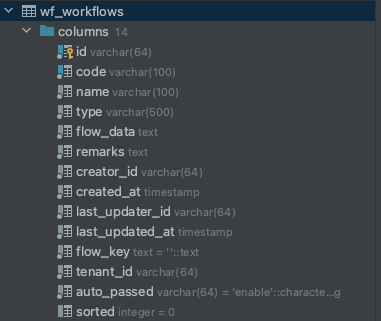
| 字段 | 说明 | 备注 |
|---|---|---|
| id | id | 表中唯一 |
| tenant_id | 单位id | |
| code | 流程编码 | 不可重复 |
| name | 流程名称 | |
| type | 系统模块 | |
| flow_data | 流程内容 | 流程xml文件内容 |
| remarks | 流程备注 | |
| creator_id | 创建人id | |
| created_at | 创建时间 | |
| last_updater_id | 更新人id | |
| last_updated_at | 更新时间 | |
| flow_key | 流程的key | 从流程的xml文件中解析出来,命名规则:journal-appointment(type) + _ + a1fa8c64c75f4bc5b520bd6b8af5f6f9(tenant_id) |
| auto_passed | 是否自动审核 | 相邻审核节点操作和表单一样时可自动审核 |
| sorted | 排序 |
- 流程节点配置请参考。。。。。
2. 配置新增页面和权限
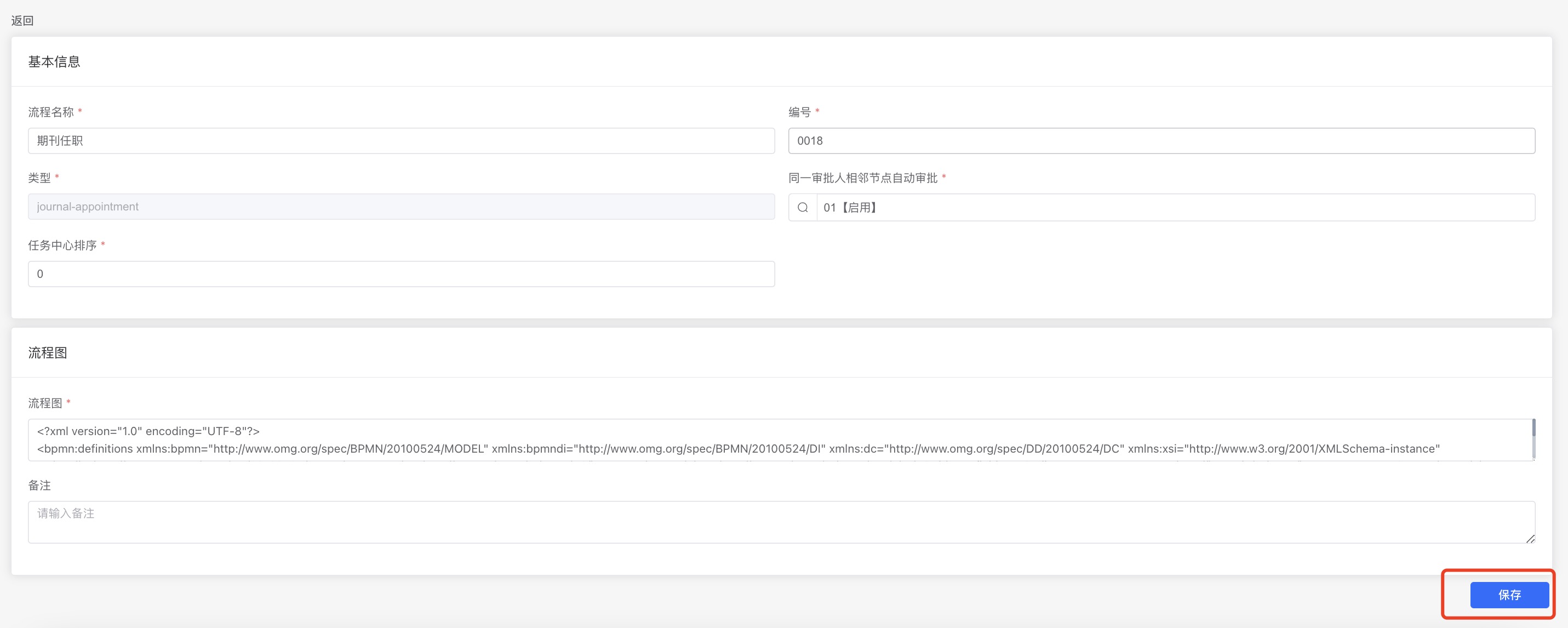
后台代码关闭了自动发布流程的功能,可以在新增流程后在前端页面发布流程(流程管理页面,点击流程详情,点击保存)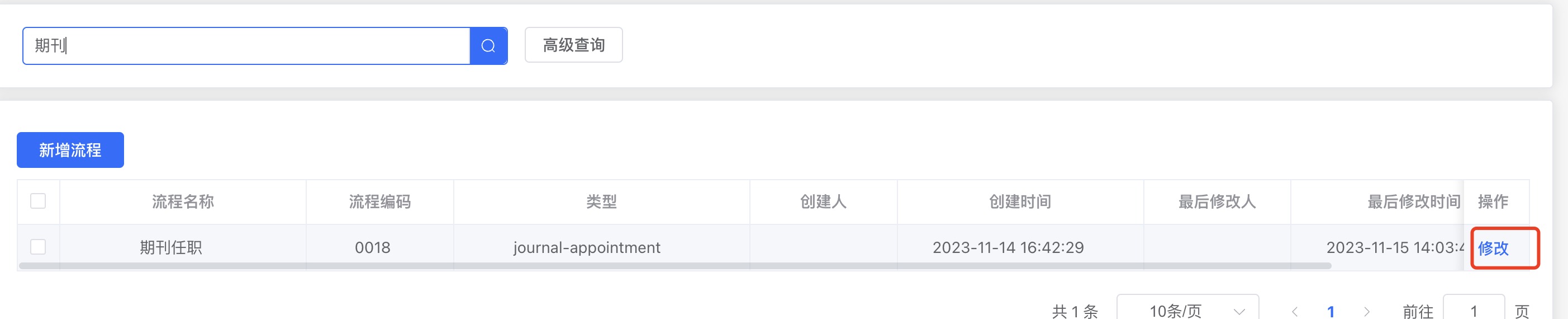
3. 配置新增页面和权限
- 在
/router/index.ts目录下配置出新增页面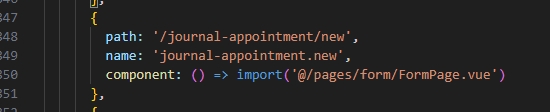
- 配置新增权限,表名是iam_authorities,id等于配置路由时的name,parent_id等于列表的父级菜单id(模块名称),sql语句为
insert into iam_authorities(id, parent_id, name, remarks)
VALUES ('association-appointment.new', 'association-appointment', '新增团体任职', '新增团体任职');
- 配置出页面和权限之后,系统在进入页面时会去请求接口
/form-deployments/{id},然后就会根据自定义表单查询返回对应的数据。
4. 配置新增按钮
- 在
/components/dynamic-action-config.ts添加按钮配置
key是模块名称,type是操作类型,label是按钮提示文字
5. 配置自定义表单
- 表单配置参考自定义表单配置
6. Java后端需要实现的接口
在
CamundaListener.java可以看到有一些事件的接口需要处理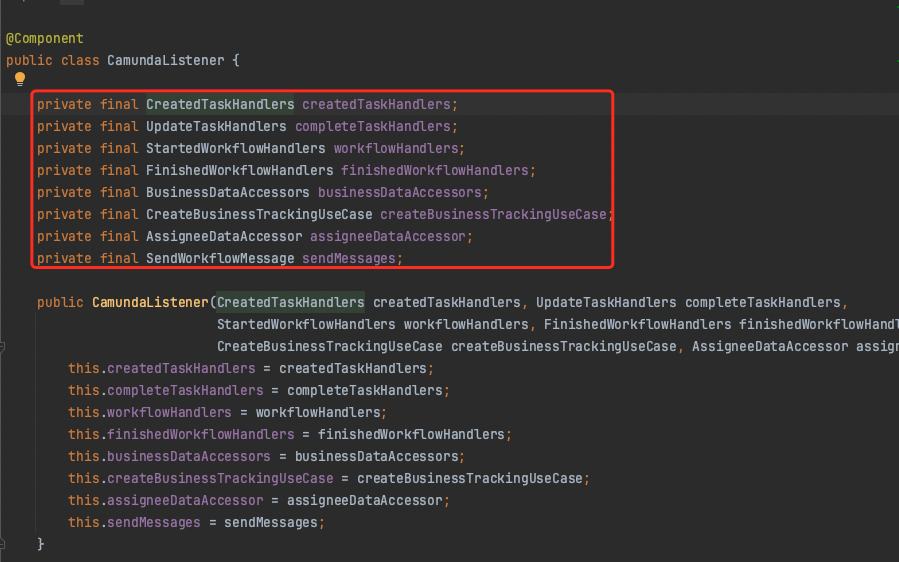
CreatedTaskHandlers流程创建Task时业务需要做的编码,请参考期刊任职写的代码,如下图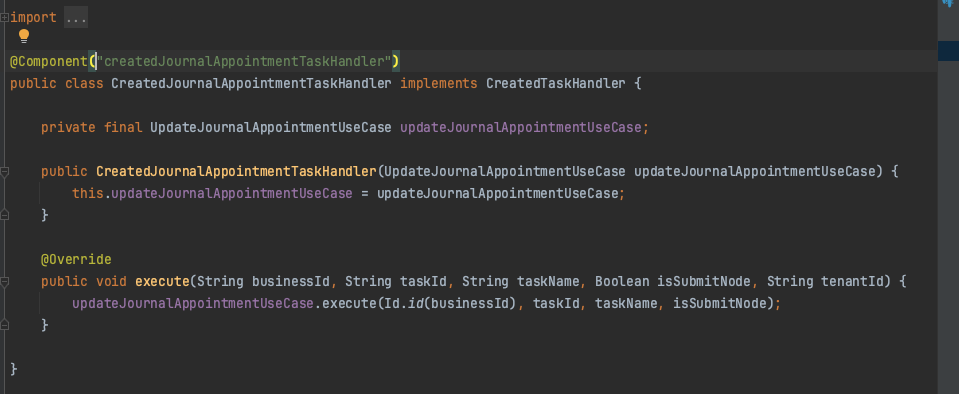
UpdateTaskHandlers流程更新Task时业务需要做的编码,请参考期刊任职写的编码,如下图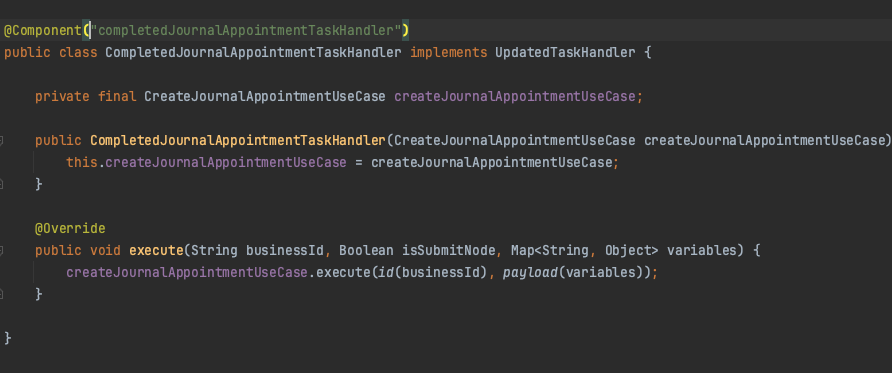
StartedWorkflowHandlers流程开始时业务需要做的编码,请参考期刊任职写的编码,如下图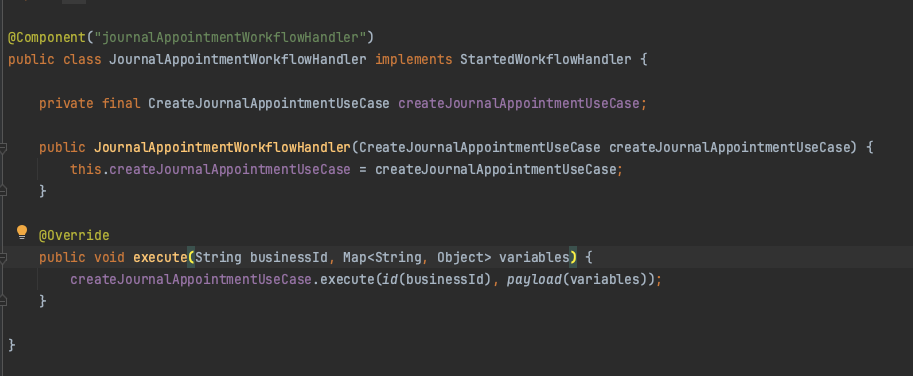
作者:马翠萍 创建时间:2024-02-27 14:25
最后编辑:马翠萍 更新时间:2026-10-22 08:56
最后编辑:马翠萍 更新时间:2026-10-22 08:56